Posts

Blog 7

Image
This week my main focus to create my character in my game. The character is a green square shaped object. I took some screenshots of it. Also I'm working on the properties of the character. I been learning how to code in Godot's language its very different from Java what I'm used to. Next step would be getting my characters moving. I included some Godot codes screenshots also.
Blog 6

Image
As I progressed in my Android Studio journey I found that the speed was terrible. So I cleaned my C drive about 7 gigs cleaned out. I was still having problems so did some research. To run Android Studio you need at least Intel iCore 5 to process everything also need 8 gigs of ram for temporary storage on top of that SSD is necessary to keep permanent files. To run things more smoothly a good graphic card is highly recommend. My laptop currently meets none of the requirements as it has a 2 gigs of ram Intel Celeron( not even iCore 3) and HDD. After talking and surrounding myself with other software engineers they recommended that I try an install a game development program called Godot its only requirement is that it needs about 4 gigs of ram. Godot is free 2D and 3D game developing program that's open to the pubic. My best option would be to run Godot on my computer and find out.

Blog 5

Image
Android Studios is up and ready on laptop but one thing is that its a lags a lot. My C drive is pretty full so i need to make some space on it. I decided that i want to do a game application. The app would take a picture and  the other person would try to guess what the picture is and they would use a keyboard to type in an answer. So far I been watching a lot of tutorials on how to use Android Studios on YouTube.  

Blog 4

After meeting with Professor Frisby last Thursday I've decided that this semester I want to dive a little deeper and go into app development. Currently I'm taking CSC 205 which is object oriented programming and feel more comfortable in development. The application would be specifically for androids phones and could be available in Google Play Store. Right now I'm brainstorming ideas for what the app would do I was thinking about a simple game or something that would help make life easier for people. Right now the first step is downloading Android Studios on my computer. In my next Blog I'll be going more in depths.

Downloading an Operating System

Image
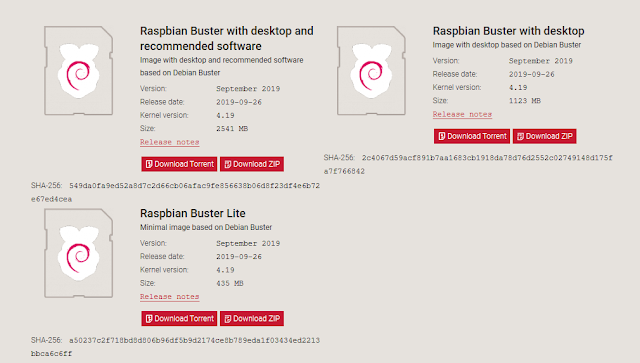
I did some research and found out what is best to install on the Raspberry Pi. As of right now I’m working on getting started on the first part of the project which means downloading Raspbian on the Raspberry Pi. To download Raspbian I would need to take a micro SD card and download the program of the raspberry pie website I did a little bit of research and it should take me about six hours to complete the download but after that I will need to take the SD card that’s been formatted and drag the downloaded Files onto it the next I would need to take it and plug it into the raspberry pie which then will give me options to pick which download after that I’ll pick Raspbien with desktop and recommended applications. After doing some research on which version I should download the recommended download is the most appropriate for the project. 

Blog 3

We tried to download tensor flow and got an error saying it was unsuccessful download. I took another approach and it also failed so the next step would be to meet with Dr. Frisby and ask him for advice. Once we get Tensor Flow running then we would feed it pictures so the program could decide what's a student screenshot and what's not a student screenshot. The images we feed it the more efficient it becomes.

Blog 2

Image
Just had a meeting with Dr. Frisby and other STEAM students involved. We discussed plans to work on a program called Tensor Flow the program receives images from computer screenshots of student’s homework that they turn in and with machine learning analyzes those screenshots. The tricky part is how Tensor Flow decides if it’s a screenshot from the homework or if its a random picture. Also I got the Raspberry Pi computer set up and the next step would be to download Tensor Flow on it.